Jenkins

Welcome to how I used our favorite Butler to make the automatization of Rotten Bloom.
In this project we decided to use Jenkins to:
- Make builds of the game on Development and Shipping depending on the day of the week.
- Sending Discord notifications about the builds.
- Saving the builds to a Google Drive folder.
Now, without further ado, let’s get into it!

How I made the builds
First of all, it’s important to know that we used Perforce as the control version for the development of the game, so naturally, Jenkins searched for any changes on our Perforce server.
Our schedule was, everyday at 8:00 a.m. and 5:00 p.m. Jenkins searched for any changes in our workspace and if found, he made a Build for QA (in our case the Production team) to test the game. This builds where made in Development except for Wednesday that were Shipping day!
def CheckForChanges(workspace, user, port, pass, force)
{
	//p4Utils.trust("${port}","${fingerprint}")
    p4Utils.setEnvironmentSettings("${workspace}","${user}","${port}","${pass}")
    def changelist = p4Utils.getCurrentChangelist("${workspace}")
    changelist=changelist.trim()
    println changelist

    if(fileExists("${stampsPath}\\DemoUEBuildCh.txt")){
    	def lastBuiltChangelist = readFile "${stampsPath}\\DemoUEBuildCh.txt"
    	lastBuiltChangelist = lastBuiltChangelist.trim()

    	if ("${changelist}" == "${lastBuiltChangelist}" && !force){
    		println "NO CHANGES YET"
    	}else{
    		println "LAST BUILT CHANGELIST: ${lastBuiltChangelist}"
    		p4Utils.getLatest("${workspace}","${user}","${port}","${pass}")
    		build job: 'Ue5Build', parameters: [
        		string(name: 'CHANGELIST', value: "${changelist}")
        	]
    	}
    }
    else{
    	SetDemoUEBuildCh(1)
    }
}
After that, we call the function UEBuild() inside of UEBuildUtils.
def UEBuild(projectWorkspace, projectName, buildType, changelist){

	bat "if exist ${projectWorkspace}\\temp rd /s /q ${projectWorkspace}\\temp"

	bat "if exist \"${projectWorkspace}\\Binaries\" rmdir /s /q \"${projectWorkspace}\\Binaries\""
	bat "if exist \"${projectWorkspace}\\Intermediate\" rmdir /s /q \"${projectWorkspace}\\Intermediate\""

	bat "\"${ue4Path}\\${engineVersion}\\Engine\\Binaries\\DotNET\\UnrealBuildTool\\UnrealBuildTool.exe\" -projectfiles -project=\"${projectWorkspace}\\${projectName}.uproject\" -game -rocket -progress"

	bat "\"${ue4Path}/${engineVersion}/Engine/Binaries/DotNET/UnrealBuildTool/UnrealBuildTool.exe\" ${projectName} ${buildType} Win64 -project=\"${projectWorkspace}/${projectName}.uproject\" -rocket -editorrecompile -progress -noubtmakefiles -NoHotReloadFromIDE -2022"

	bat "if not exist \"${projectWorkspace}/temp/x64\" mkdir \"${projectWorkspace}/temp/x64\""

	bat "\"${ue4Path}\\${engineVersion}\\Engine\\Build\\BatchFiles\\RunUAT.bat\" BuildCookRun -project=\"${projectWorkspace}\\${projectName}.uproject\" -noP4 -platform=Win64 -clientconfig=${buildType} -cook -allmaps -build -stage %USE_PAK% -archive -archivedirectory=\"${projectWorkspace}/temp/x64\""
}
As simple as that!
Jenkins started to cook our game, once it finished, he sent us a Discord notification and save it in Google Drive.
But how? you may ask, well…
Sending Discord notifications
Even though it was a great feature… sometimes it felt like this:

If everything was alright, we got a success notification with the link to download the build.
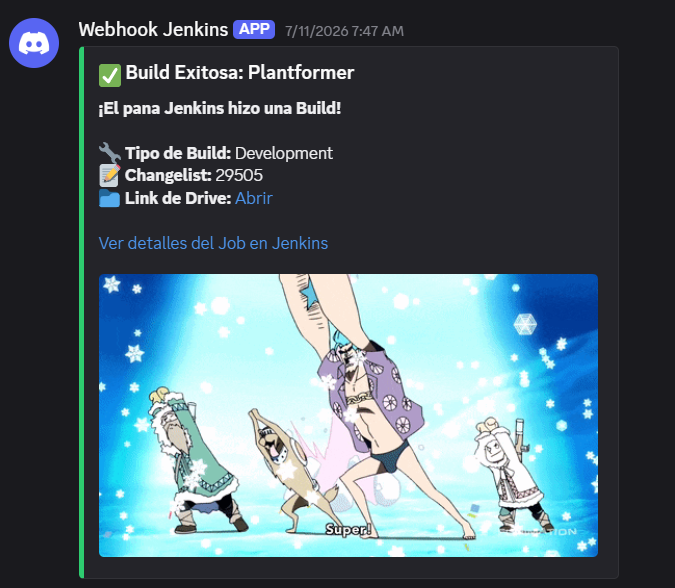
But if there was something wrong (like the time that the art team started to put the art of the game) Jenkins schooled us with this message.
The good part is that we could enter into the Jenkins website to check what happened and fix it before it was too late…
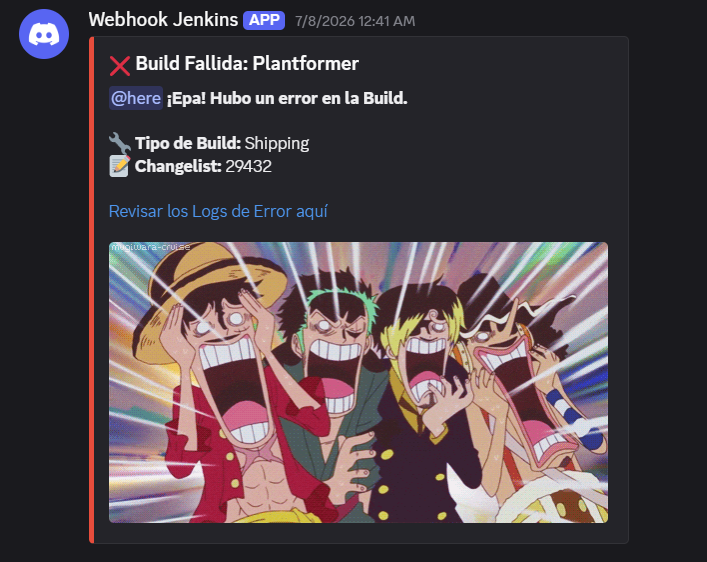
Anyway, the Discord notification was implemented like this:
def NotifySuccess(projectName, buildType, changelist, driveFolderId){
    def gifUrl = "https://media1.giphy.com/media/v1.Y2lkPTc5MGI3NjExYXl3NzdkdThmMHY4ZmNqbzJheWc0aW0xMDhsa2p6eXR6bjB5YTZ5bSZlcD12MV9pbnRlcm5hbF9naWZfYnlfaWQmY3Q9Zw/4uMy0wqz6V1SM/giphy.gif"
    def driveLink = env.DRIVE_FILE_LINK ?: "https://drive.google.com/drive/folders/${driveFolderId}"
    def buildUrl = env.BUILD_URL

    def payload = """
        {
            "embeds": [{
                "title": "✅ Build Exitosa: ${projectName}",
                "description": "**¡El pana Jenkins hizo una Build!**\\n\\n**🔧 Tipo de Build:** ${buildType}\\n**📝 Changelist:** ${CHANGELIST}\\n**📁 Link de Drive:** [Abrir](${driveLink})\\n\\n[Ver detalles del Job en Jenkins](${buildUrl})",
                "color": 3066993,
                "image": { "url": "${gifUrl}" }
            }]
        }
    """.stripIndent().trim()

    writeFile file: 'discord_payload.json', text: payload

    bat 'curl.exe -k -X POST "%DISCORD_URL%" -H "Content-Type: application/json" -d @discord_payload.json'

    println "✅ Notificación de éxito enviada a Discord"
}

def NotifyFailure(projectName, buildType, changelist){
    def gifUrl = "https://media0.giphy.com/media/v1.Y2lkPTc5MGI3NjExamQzc2pybGFzN2VobWdkc2V4OHl6MW54MTl4cnk4ZHRyOW9qa3o3YiZlcD12MV9pbnRlcm5hbF9naWZfYnlfaWQmY3Q9Zw/Ai8iZqHx2i0fK/giphy.gif"
    def buildUrl = "${env.BUILD_URL}console"

    def payload = """
        {
            "embeds": [{
                "title": "❌ Build Fallida: ${projectName}",
                "description": "@here **¡Epa! Hubo un error en la Build.**\\n\\n**🔧 Tipo de Build:** ${buildType}\\n**📝 Changelist:** ${CHANGELIST}\\n\\n[Revisar los Logs de Error aquí](${buildUrl})",
                "color": 15158332,
                "image": { "url": "${gifUrl}" }
            }]
        }
    """.stripIndent().trim()

    writeFile file: 'discord_payload.json', text: payload

    bat 'curl.exe -k -X POST "%DISCORD_URL%" -H "Content-Type: application/json" -d @discord_payload.json'

    println "❌ Notificación de fallo enviada a Discord"
}
Saving the Build in Google Drive
At the time of the development of the game I couldn’t find a plug in for Jenkins to save a zip file in Drive so I found a workaround.
A program called rclone. I added the program to our Perforce server and execute it once the build was finished.
      stage('Drive') {
            steps {
                withCredentials([file(credentialsId: 'rclone-google-drive-config', variable: 'CONFIG_PATH')]) {
                    script {
                        println "🚀 Uploading Build to Drive..."
                        def shareLink = driveUtils.UploadToDrive(
                            "${PROJECT_WORKSPACE}",
                            "${PROJECT_NAME}",
                            "${FINAL_BUILD_TYPE}",
                            "${CHANGELIST}",
                            "${RCLONEP4_PATH}",
                            "${DRIVEFOLDER_ID}"
                        )
                        env.DRIVE_FILE_LINK = shareLink
                    }
                }
            }
}def UploadToDrive(projectWorkspace, projectName, buildType, changelist, rcloneP4Path, driveFolderId) {
def fileName = "${projectName}_${buildType}_${changelist}_x64.rar"
def timestamp = new Date().format('dd-MM-yyyy')
def remotePath = "MyDrive:${buildType}/${timestamp}/${fileName}"
def shareLink = ""
println "--- UPLOADING TO DRIVE ---"
println "File: ${fileName}"
bat """
"${rcloneP4Path}\\rclone.exe" copyto ".\\${fileName}" "MyDrive:${buildType}/${timestamp}/${fileName}" ^
--config "%CONFIG_PATH%" ^
--drive-root-folder-id ${driveFolderId} ^
--progress -v
"""
def rawOutput = bat(
script: """
"${rcloneP4Path}\\rclone.exe" link "${remotePath}" ^
--config "%CONFIG_PATH%" ^
--drive-root-folder-id ${driveFolderId}
""",
returnStdout: true
).trim()
shareLink = rawOutput.readLines().last().trim()
println "--- SHARE LINK: ${shareLink} ---"
return shareLink
}And with that, the team could find a really organized Drive folder with the Builds!
