Rotten Bloom
Hi there!
Welcome to one of the biggest projects that I had the pleasure of working on.
Rotten Bloom is a Metroidvania made in Unreal Engine 5 by 14 amazing people divided by Programing, Design, Art and Production teams.
I was part of the Programing team and my key responsibilities were:
- Implementing the Gameplay Ability System (GAS).
- Building the combat of the game.
- Implementing the UI of the game.
- Some gameplay stuff.
- Automatizing the games with the help of our favorite butler Jenkins.
If you are interested in trying the game, click here and check in out!
A little notice before you read, I can’t show every piece of the game that I made because it could make this post reaaaaaaally long (it already is…). So I decided to show what I think is the most interesting parts of the game.
Now without further ado, let’s goooo!
How did I implement the Gameplay Ability System (GAS)
When starting the implementation of the game, a lot of people told me that GAS was really difficult and that there were a lot of concepts to learn and that it wasn’t worth the time investment. But I’m a person that believes that if it is going to bear fruits in the long run, it is better to invest the time at the beginning.
Don’t get me wrong, it is a lot of time invested and usually makes one feel like sisyphus – Gameplay Abilities, Gameplay Effects, Gameplay Tags, Cues… there’s always something new on the horizon. But now, the question is… was it worth it?

So let’s dig in!
Since we decided to create a custom MovementComponent for our game, our Player and enemies are Pawns. Because of that I decided to create a BasePawn with all the necessary components following the Duck Type concept.
// We need to use this Unreal Macro to create a delegate for the Pawn Health
DECLARE_MULTICAST_DELEGATE_OneParam(FOnHealthChangedSimple, float);

UCLASS(Blueprintable)
class PLANTFORMER_API ABasePawn : public APawn, public IAbilitySystemInterface
{
    GENERATED_BODY()

protected:
    /** Ability System Component. Required to use Gameplay Attributes and Gameplay Abilities. */
    UPROPERTY(VisibleDefaultsOnly, BlueprintReadOnly, Category = "Abilities")
    TObjectPtr<UPlantformerAbilitySystemComponent> AbilitySystemComponent;

public:
	// We add our delegate here, remember to use the same name as above
	FOnHealthChangedSimple OnHealthChangedSimple;

    // Default ability to give to the character.
    UPROPERTY(EditDefaultsOnly, Category = "Abilities")
    TArray<TSubclassOf<UGameplayAbility>> DefaultAbilities;

    // A class to handle the Pawn attributes like health and maxHealth.
    UPROPERTY(VisibleAnywhere, BlueprintReadOnly, Category = "Attributes")
    TObjectPtr<UGAS_AttributeSet> AttributeSet;

    // A Data Table for designers.
    UPROPERTY(EditAnywhere, BlueprintReadOnly, Category = "Attributes")
    TObjectPtr<UDataTable> AttributeTable;

    // Called when the character (AI, Enemy, NPC) is possessed by a controller.
    virtual void PossessedBy(AController* NewController) override;
    UFUNCTION(BlueprintCallable, BlueprintPure, Category = "Abilities")
    virtual UPlantformerAbilitySystemComponent* GetAbilitySystemComponent() const override { return AbilitySystemComponent; }
};
That would be the header file. As you can see, this is typical tutorial stuff… The important thing to notice here is that by making a BasePawn the inheritance magic will make all of the Pawns from our game have GAS!
But wait! We need to initialize everything in the cpp file… How can we do that? Well…
// First we use the constructor
ABasePawn::ABasePawn()
{
	PrimaryActorTick.bCanEverTick = true;

	// Create the Attribute Set, this object will hold all the attributes for our character
	AttributeSet = CreateDefaultSubobject(TEXT("AttributeSet"));

	// GAS Initialization -----------------------------------------------------------------------------
	AbilitySystemComponent = CreateDefaultSubobject(TEXT("AbilitySystemComponent"));
	AbilitySystemComponent->SetIsReplicated(true);
	AbilitySystemComponent->SetReplicationMode(_replicationMode);

}

/*So it is important to initialize all GAS stuff at PossessedBy
because if not Unreal will get crazy*/
void ABasePawn::PossessedBy(AController* NewController)
{
	Super::PossessedBy(NewController);

	if (!IsValid(AbilitySystemComponent)) return;

	AbilitySystemComponent->InitAbilityActorInfo(this, this);

	GiveAbilities();

	//We will also initilize our health delegate here!
	_healthChangedHandle = AbilitySystemComponent->GetGameplayAttributeValueChangeDelegate(
		UGAS_AttributeSet::GetCurrentHealthAttribute()
	).AddUObject(this, &ABasePawn::OnHealthChanged);

	InitializeAttributes();
}

void ABasePawn::InitializeAttributes() const
{
	if (IsValid(AbilitySystemComponent) && IsValid(AttributeTable))
	{
		AbilitySystemComponent->InitStats(UGAS_AttributeSet::StaticClass(), AttributeTable);

		if (IsValid(AttributeSet))
		{
			AttributeSet->SetCurrentHealth(AttributeSet->GetMaxHealth());
		}
	}
}

// Remember our Delegate? Here we will make the broadcast!
void ABasePawn::OnHealthChanged(const FOnAttributeChangeData& Data) const
{
	if (IsPlayerControlled())
	{
		OnHealthChangedSimple.Broadcast(Data.NewValue);
	}
}
And that would be it… kind of. This is just the tip of the iceberg but it gives us a solid base to create abilities for our player and enemies!
Important stuff: In GAS is necessary to initialize the abilities and we do it here inside the GiveAbilities() function but I will skip the implementation since is basic GAS stuff.
We can see how to make an ability with the attack ability.
How I built the attack ability
Since the GameplayAbilities don’t have Tick we decided to create 2 classes for some of the abilities, for example AttackAbility and AttackComponent. That way we can take full advantage of Unreal.
So let’s get to it.

First I made my Ability.
Since we need to communicate with the component we will need to create some delegates (more of that later) and some functions to execute!
UCLASS()
class PLANTFORMER_API UAttackAbility : public UBaseAbility
{
	GENERATED_BODY()

protected:
	virtual void ActivateAbility(
		const FGameplayAbilitySpecHandle Handle,
		const FGameplayAbilityActorInfo* ActorInfo,
		const FGameplayAbilityActivationInfo ActivationInfo,
		const FGameplayEventData* TriggerEventData
	) override;

	virtual void EndAbility(
		const FGameplayAbilitySpecHandle Handle,
		const FGameplayAbilityActorInfo* ActorInfo,
		const FGameplayAbilityActivationInfo ActivationInfo,
		bool bReplicateEndAbility,
		bool bWasCancelled
	) override;

public:
	UAttackAbility();

	// Delegate called functions
	virtual void OnAttackStarted();
	virtual void OnHitDetected(const FHitResult& HitResult);
	UFUNCTION()
	virtual void OnMontageCompleted();
	UFUNCTION()
	virtual void OnMontageCancelled();

protected:
	UPROPERTY(EditAnywhere, meta=(ToolTip = "Effect to apply damage to Target Actor"), Category = "Ability|Attack")
	TSubclassOf<UGameplayEffect> _damageEffect;

	UPROPERTY(EditAnywhere, meta=(ToolTip = "Effect to apply hit to Target Actor"), Category = "Ability|Attack")
	TSubclassOf<UGameplayEffect> _hitEffect;

	UPROPERTY(EditAnywhere, meta=(ToolTip = "Knockback to apply on hit"), Category = "Ability|Knockback")
	TSubclassOf<UGameplayEffect> _knockbackEffect;

	UPROPERTY(EditAnywhere, meta=(ToolTip = "The strength of the Knockback"), Category = "Ability|Knockback")
	float _knockbackStrength { 500.f };
And now the AttackComponent with the promised Delegates.
DECLARE_MULTICAST_DELEGATE_OneParam(FOnHitDetected, const FHitResult&);
DECLARE_MULTICAST_DELEGATE(FOnAttackStarted);

UCLASS(ClassGroup=(Custom), meta=(BlueprintSpawnableComponent))
class PLANTFORMER_API UAttackComponent : public UActorComponent
{
	GENERATED_BODY()

public:
	// Delegates
	FOnAttackStarted OnAttackStarted;
	FOnHitDetected OnHitDetected;

	EAttackState AttackState = EAttackState::Idle;

private:
	UPROPERTY()
	FVector _startPoint;

	UPROPERTY(EditAnywhere, meta=(ToolTip = "Offset of the hitbox center"), Category = "Attack")
	FAttackOffset _attackOffset;

	UPROPERTY(EditAnywhere, meta=(ToolTip = "Range of the attack"), Category = "Attack")
	float _attackRange { 1.f };

	UPROPERTY(EditAnywhere, meta=(ToolTip = "Size of the attack box"), Category = "Attack")
	FVector _hitboxExtent { FVector(15.f, 15.f, 15.f) };

	UPROPERTY(EditAnywhere,
		meta=(ToolTip = "The speed of the attack", ClampMin = "1.0", ClampMax = "5.0", UIMin = "1.0", UIMax = "5.0"),
		Category = "Attack")
	float _attackSpeed { 2.0f };

	UPROPERTY(EditDefaultsOnly, Category = "Attack",
		meta=(ToolTip = "Time window after an attack to chain the next combo hit"))
	float _comboResetDelay { 0.4f };

	UPROPERTY()
	int32 _comboIndex { 0 };

	UPROPERTY(EditAnywhere, meta=(ToolTip = "Max attack combo"), Category = "Attack")
	int32 _maxComboIndex { 4 };

	UPROPERTY(EditAnywhere,
		meta=(ToolTip = "Cooldown after exhausting the full combo", ClampMin = "0.5", ClampMax = "5.0", UIMin = "0.5", UIMax = "5.0"),
		Category = "Attack")
	float _comboCooldown { 2.0f };

	UPROPERTY(VisibleAnywhere, meta=(ToolTip = "When does the player can attack again"), Category = "Attack")
	float _nextAttackTime { 0.0f };

	UPROPERTY(VisibleAnywhere, meta=(ToolTip = "Whether the player can attack or not"), Category = "Attack")
	bool _bCanAttack { true };

	UPROPERTY(EditAnywhere, meta=(ToolTip = "Collision channel to detect the target"), Category = "Attack")
	TEnumAsByte<ECollisionChannel> _collisionChannel { ECC_Pawn };

	bool _bIsTracing { false };

	FTimerHandle _comboResetTimer;

	//Hitbox Properties ------------------------------------------------------------------------------------------------

	// We select the Object Types we want to hit using a collision channel
	TArray<TEnumAsByte<EObjectTypeQuery>> _objectTypes;
	// Actors that were hit by the trace
	TArray<FHitResult> _hitResults;
	// Actors that were already hit during the current attack, to avoid hitting them multiple times
	TArray<TObjectPtr<AActor>> _alreadyHitActors;
	// Actors to ignore in general
	TArray<TObjectPtr<AActor>> _ignoreActors;

public:
    UAttackComponent();

    bool HandleAttackInput();
	bool StartAttack();
	void ResetAttack();
	void OnAttackAnimationEnded();

	void SetTracing(bool bActive);
	void PerformTrace();
	bool IsComboActive() const;

private:
	bool IsHitActorImmune(AActor* HitActor);
	void ResetComboIndex();
Huff… That was a lot, but it look pretty.
Now, once the Player presses the attack input, the PlayerController calls the ability and gets executed. Then, inside the ability we subscribe the Delegates and call the AttackComponent. Let’s see how!
/* We don't want to wait for this ability to finish in order to
  excecute it again */
UAttackAbility::UAttackAbility()
{
	bRetriggerInstancedAbility = true;
}

void UAttackAbility::ActivateAbility(
	const FGameplayAbilitySpecHandle Handle,
	const FGameplayAbilityActorInfo* ActorInfo,
	const FGameplayAbilityActivationInfo ActivationInfo,
	const FGameplayEventData* TriggerEventData)
{
	Super::ActivateAbility(Handle, ActorInfo, ActivationInfo, TriggerEventData);

	_pawnOwner = Cast<ABasePawn>(ActorInfo->AvatarActor.Get());
	if (!IsValid(_pawnOwner.Get()) || _attackMontages.IsEmpty())
	{
		EndAbility(Handle, ActorInfo, ActivationInfo, true, true);
		return;
	}

	_attackComponent = _pawnOwner->GetAttackComponent();
	if (!_attackComponent.IsValid())
	{
		EndAbility(Handle, ActorInfo, ActivationInfo, true, true);
		return;
	}

	if (!_attackComponent->IsComboActive())
	{
		EndAbility(Handle, ActorInfo, ActivationInfo, true, true);
		return;
	}

	// Add the new delegates
	_attackComponent->OnAttackStarted.AddUObject(this, &UAttackAbility::OnAttackStarted);
	_attackComponent->OnHitDetected.AddUObject(this, &UAttackAbility::OnHitDetected);

	PreloadNiagaraEffects();

	_attackComponent->HandleAttackInput();
}
Now, if you noticed the ability can be retriggered, the idea is for the designer to handle when the next attack can be triggered and not Unreal. That’s one of the reasons why we have an AttackComponent, we can perform the check inside the Tick!
void UAttackComponent::TickComponent(
	float DeltaTime,
	ELevelTick TickType,
	FActorComponentTickFunction* ThisTickFunction)
{
	Super::TickComponent(DeltaTime, TickType, ThisTickFunction);

	UWorld* World = GetWorld();
	if (!World) return;

	// We check if the player can attack again based on the attack speed
	_bCanAttack = (World->GetTimeSeconds() >= _nextAttackTime);

	// If the player is currently attacking, we perform the trace to detect hits
	if (_bIsTracing)
	{
		PerformTrace();
	}
}

bool UAttackComponent::HandleAttackInput()
{

	if (!_bCanAttack) return false;

	if (!IsComboActive())
	{
		_comboIndex = 0;
	}

	_hitResults.Reset();
	_ignoreActors.Reset();

	StartAttack();
	return true;
}

bool UAttackComponent::StartAttack()
{
	UWorld* World = GetWorld();
	if (!World) return false;

	World->GetTimerManager().ClearTimer(_comboResetTimer);

	AttackState = EAttackState::Attacking;
	++_comboIndex;

	const float Cooldown = IsComboActive() ? (1.f / _attackSpeed) * 0.95f : _comboCooldown;
	_nextAttackTime = World->GetTimeSeconds() + Cooldown;

	OnAttackStarted.Broadcast();

	return true;
}
As you can see, everything that we could handle here is done.
If you know a bit about GAS you know that the abilities are the ones in charge to handle the animations and other stuff but, we’re not in the ability now… that’s why we created the delegates, now we can return to the ability with OnAttackStarted.Broadcast().
Let’s see what happens there.
void UAttackAbility::OnAttackStarted()
{
	if (!IsValid(_pawnOwner.Get())) return;

	int32 ComboIndex = _attackComponent->GetComboIndex() % 2;

	/**
	* Since this ability can be used by any pawn
	* we need to create a unique instance of the montage for each pawn
	* to avoid conflicts when multiple pawns use the same ability at the same time.
	*/
	UAnimMontage* Montage = _attackMontages[ComboIndex];
	if (!Montage) return;

	float AttackRate  = _attackComponent->GetAttackSpeed();
	float NormalizedRate = FMath::Clamp((AttackRate - _minAttackRate) / (_maxAttackRate - _minAttackRate), 0.0f, 1.0f);
	float PlayRate = FMath::Lerp(_minPlayRate, _maxPlayRate, NormalizedRate);

	_currentTask = UAbilityTask_PlayMontageAndWait::CreatePlayMontageAndWaitProxy(
		this,
		NAME_None,
		Montage,
		PlayRate
	);

	if (!IsValid(_currentTask)) return;
	_currentTask->OnCompleted.AddDynamic(this, &UAttackAbility::OnMontageCompleted);
	_currentTask->OnCancelled.AddDynamic(this, &UAttackAbility::OnMontageCancelled);
	_currentTask->OnInterrupted.AddDynamic(this, &UAttackAbility::OnMontageCancelled);

	_currentTask->ReadyForActivation();
}
And that would be it thank you for…
Alfonso (Good): Wait! What about the PerformTrace() function inside AttackComponent? I did not see anything there, you’re going to explain that, right?
Alfonso (Bad): Shhh, I thought no one would notice…
Ups! I forgot to talk about the Animation Notifies.

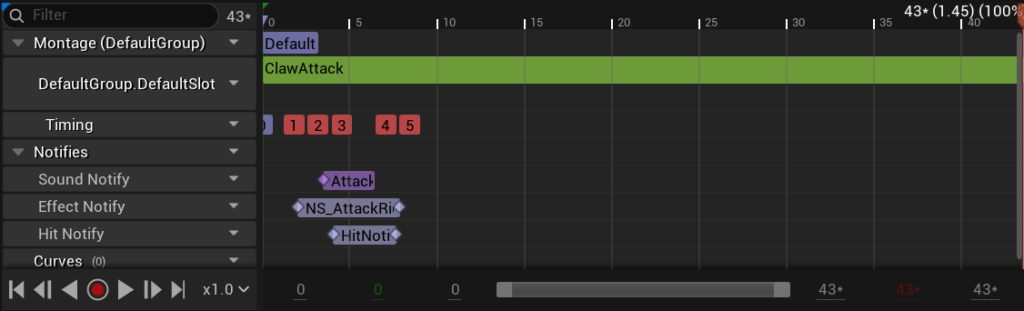
I wanted for the Designers to be able to determine when they wanted the Attack Hit box to appear, so I added a simple Notify State to the Animation Montage of the attack.
void UHitNotifyState::NotifyBegin(
	USkeletalMeshComponent* MeshComp,
	UAnimSequenceBase* Animation,
	float TotalDuration,
	const FAnimNotifyEventReference& EventReference)
{
	Super::NotifyBegin(MeshComp, Animation, TotalDuration, EventReference);

	if (IsValid(MeshComp))
	{
		ABasePawn* BasePawn = Cast(MeshComp->GetOwner());
		if (IsValid(BasePawn))
		{
			UAttackComponent* AttackComponent = BasePawn->GetAttackComponent();
			if (IsValid(AttackComponent))
			{
				AttackComponent->SetTracing(true);
			}
		}
	}
}

void UHitNotifyState::NotifyEnd(
	USkeletalMeshComponent* MeshComp,
	UAnimSequenceBase* Animation,
	const FAnimNotifyEventReference& EventReference)
{
	Super::NotifyEnd(MeshComp, Animation, EventReference);

	if (IsValid(MeshComp))
	{
		ABasePawn* BasePawn = Cast(MeshComp->GetOwner());
		if (IsValid(BasePawn))
		{
			UAttackComponent* AttackComponent = BasePawn->GetAttackComponent();
			if (IsValid(AttackComponent))
			{
				AttackComponent->SetTracing(false);
			}
		}
	}
}
As you can see, it sets the Tracing Bool of the AttackComponent to true or false depending on the animation frame. And with that the PerformTrance() function starts.
void UAttackComponent::PerformTrace()
{
	//In order to get the sockets of the player we need to get the Skeletal Mesh
	ABasePawn* OwnerPawn = Cast(GetOwner());
	if (IsValid(OwnerPawn))
	{
		const bool bAttackerIsPlayer = OwnerPawn->ActorHasTag(AttackComponentTags::PlayerTag) || OwnerPawn->IsPlayerControlled();
		AActor* PlayerPawn = nullptr;
		if (!bAttackerIsPlayer)
		{
			PlayerPawn = UGameplayStatics::GetPlayerPawn(GetWorld(), 0);
		}

		if (USkeletalMeshComponent* Mesh = OwnerPawn->GetSkeletalMeshComponent())
		{
			// We get the location of the socket we want to use as the center of our attack
			FTransform SocketTransform = Mesh->GetSocketTransform("AttackBoxSocket");
			_startPoint = SocketTransform.GetLocation();

			FVector ForwardVector = GetOwner()->GetActorForwardVector();
			ForwardVector.Y = 0.f;
			ForwardVector.Normalize();

			_startPoint.X += ForwardVector.X * _attackOffset.X;
			_startPoint.Z += _attackOffset.Z;

			FVector EndPoint = _startPoint + ForwardVector * _attackRange;

			// We ignore ourselves
			_ignoreActors.Add(OwnerPawn);
			_ignoreActors.Append(_alreadyHitActors);

			// Actors that were hit
			TArray OutActors;

			bool bHit = UKismetSystemLibrary::BoxTraceMultiForObjects(
				GetWorld(),
				_startPoint,
				EndPoint,
				_hitboxExtent,
				GetOwner()->GetActorRotation(),
				_objectTypes,
				false,
				_ignoreActors,
				#if WITH_EDITOR
					EDrawDebugTrace::ForDuration,
				#else
					EDrawDebugTrace::None,
				#endif
				_hitResults,
				true
				#if WITH_EDITOR
					, _debugTraceColor
					, _debugHitColor
					, _debugDrawTime
				#endif
			);

			if (bHit)
			{
				for (const FHitResult& Hit : _hitResults)
				{
					AActor* HitActor = Hit.GetActor();
					if (!IsValid(HitActor))
					{
						continue;
					}

					if (!bAttackerIsPlayer && HitActor != PlayerPawn)
					{
						continue;
					}

					if (!_alreadyHitActors.Contains(HitActor))
					{
						//We save the actors that were hit to avoid hitting them multiple times during the same attack
						_alreadyHitActors.Add(HitActor);

						// We send the info to the ability system to apply the damage to the target
						if (!IsHitActorImmune(HitActor))
						{
							OnHitDetected.Broadcast(Hit);
						}
					}
				}
			}
		}
	}
}
If another Pawn collides with the hitbox we use another delegate to the AttackAbility in order to handle the damage, blink effects and knockback.
Now, while the damage effect and blink are handled by GameplayEffects, the Knockback is handled by a GameplayCue, this one makes the necessary calculations and sends the info to the MovementComponent of the respective Pawn.
void UAttackAbility::OnHitDetected(const FHitResult& HitResult)
{
	ABasePawn* TargetPawn = Cast(HitResult.GetActor());
	if (!IsValid(TargetPawn)) return;

	UAbilitySystemComponent* TargetASC = TargetPawn->GetAbilitySystemComponent();
	if (!IsValid(TargetASC)) return;

	if (IsValid(_damageEffect))
	{
		ApplyEffectToTarget(TargetASC, _damageEffect);
	}

	if (IsValid(_hitEffect))
	{
		ApplyEffectToTarget(TargetASC, _hitEffect);
	}

	if (!IsValid(_knockbackEffect)) return;

	// Use the source (instigator) ASC to build the effect context so the GameplayCue can find the instigator
	if (IsValid(_pawnOwner.Get()))
	{
		if (UAbilitySystemComponent* SourceASC = _pawnOwner->GetAbilitySystemComponent())
		{
			FGameplayEffectContextHandle EffectContext = SourceASC->MakeEffectContext();

			if (FPlantformerEffectContext* CustomContext = FPlantformerEffectContext::ExtractContext(EffectContext))
			{
				CustomContext->KnockbackStrength = _knockbackStrength;
				CustomContext->AddHitResult(HitResult, true);
				CustomContext->AddSourceObject(_pawnOwner.Get());
			}

			FGameplayEffectSpecHandle SpecHandle = SourceASC->MakeOutgoingSpec(
				_knockbackEffect,
				GetAbilityLevel(),
				EffectContext
			);

			if (!SpecHandle.IsValid() || !SpecHandle.Data.IsValid()) return;

			SourceASC->ApplyGameplayEffectSpecToTarget(*SpecHandle.Data.Get(), TargetASC);
		}
	}
}
bool AKnockbackCue::OnActive_Implementation(
	AActor* MyTarget,
	const FGameplayCueParameters& Parameters
	)
{
	/* Validations
	 * We get the validations for all the actors
	 * that we may need
	 */
	if (!IsValid(MyTarget)) return false;

	ABasePawn* TargetPawn = Cast(MyTarget);
	if (!IsValid(TargetPawn)) return false;

	UPlantformerMovementComponent* TargetMovementComp = TargetPawn->GetPlatformerMovementComponent();
	if (!IsValid(TargetMovementComp)) return false;

	UAbilitySystemComponent* TargetASC = TargetPawn->GetAbilitySystemComponent();
	if (!IsValid(TargetASC)) return false;

	if (TargetASC->HasMatchingGameplayTag(TAG_State_Dead)) return false;

	const FGameplayEffectContext* Context = Parameters.EffectContext.Get();
	if (!Context) return false;

	AActor* EffectInstigator = Context->GetEffectCauser();
	if (!IsValid(EffectInstigator)) return false;

	ABasePawn* InstigatorPawn = Cast(EffectInstigator);
	if (!IsValid(InstigatorPawn)) return false;

	UAbilitySystemComponent* InstigatorASC = InstigatorPawn->GetAbilitySystemComponent();
	if (!IsValid(InstigatorASC)) return false;

	/* Calculations
	* We get the values
	* and calculate the knockback
	*/
	const FPlantformerEffectContext* CustomContext =
		static_cast(Parameters.EffectContext.Get());

	if (!CustomContext) return false;

	float InstigatorKnockbackStrength = CustomContext->KnockbackStrength;
	FVector InstigatorKnockbackDir = CustomContext->KnockbackDirection;

	bool bFound { false };
	float TargetKnockbackResistance = TargetASC->GetGameplayAttributeValue(
		UGAS_AttributeSet::GetKnockbackResistanceAttribute(),
		bFound
	);
	if (!bFound)
	{
		TargetKnockbackResistance = 0.f;
	}

	bFound = false ;
	float TargetAddedKnockback = TargetASC->GetGameplayAttributeValue(
		UGAS_AttributeSet::GetAddedKnockbackStrengthAttribute(),
		bFound
	);
	if (!bFound)
	{
		TargetAddedKnockback = 0.f;
	}

	float TotalKnockbackStrength = InstigatorKnockbackStrength + TargetAddedKnockback - TargetKnockbackResistance;
	TotalKnockbackStrength = FMath::Clamp(TotalKnockbackStrength, 0.f, 2000.f);

	FVector KnockbackDir = MyTarget->GetActorLocation() - EffectInstigator->GetActorLocation();
	KnockbackDir.Y = 0.f;
	KnockbackDir.Z = 0.f;
	KnockbackDir = KnockbackDir.GetSafeNormal();
	KnockbackDir.Normalize();

	TargetMovementComp->ApplyKnockback(KnockbackDir * TotalKnockbackStrength);
	TargetMovementComp-> Velocity.Z = 0;
}
And that would be it for the AttackAbility. As I said before, this is just the tip of the iceberg but it gives the general idea of how the attack system of the game was implemented.
Now last but not least, the UI system of the game!

Change Abilities with UI
One of the most important mechanics of the game is the option to swap abilities throughout the game in order to reach parts of the level that where unavailable before (classic Metroidvania feature).
The interesting part tho is that when you stumble across an ability inside a Corpse you can only select one of the pair, that choice will lock you out from some places and unlock some others.
Now, if you want to change your layout, you’ll need to find a checkpoint (Clearing) in order to do so.
Also, do you remember about the GiveAbilities() function inside the BasePawn? Well, inside we initialize the Default Abilities for our Pawn like Jump, Attack, Dash and so on… but, for the abilities that you find in the Corpses I created a AbilityLayoutComponent in order to handle the initialization, swap, and so on.
So, let’s go! First we will see the how UI was made.
UCommonActivatableWidget* URootUIWidget::AddWidgetToGameLayer(TSubclassOf<UCommonActivatableWidget> Widget) const
{
	if (IsValid(Widget) && IsValid(GameLayer))
	{
		return GameLayer->AddWidget(Widget);
	}
	return nullptr;
}

void URootUIWidget::AddWidgetToMenuLayer(TSubclassOf<UCommonActivatableWidget> Widget) const
{
	if (IsValid(Widget) && IsValid(MenuLayer))
	{
		MenuLayer->AddWidget(Widget);
	}
}
I used CommonUI for the implementation, and as you can see, there’s a root UI Widget that handles the layers of the Game where
- GameLayer: would be the HUD.
- MenuLayer: would be… well, the menus.
Now with the menus itself… I will skip the Initialization and cut to the chase.
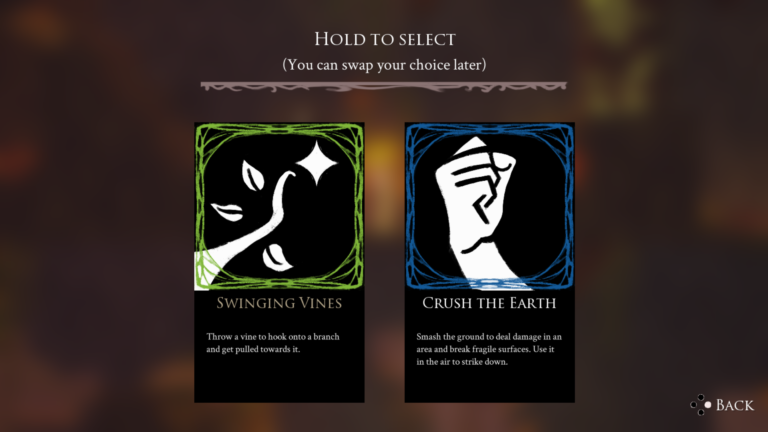
This is the Coprse Menu, and as you can see, here you can select one of the two abilities by holding the select button but, how does it work in code?
Well, there is a Corpse Actor that contains a DataAsset called AbilityPair. The idea is for the Design team to be able to create different Corpses with different ability combinations throughout the level.
UWidget* UCorpseMenuWidget::NativeGetDesiredFocusTarget() const
{
	if (IsValid(_firstAbilityButton))
	{
		return _firstAbilityButton;
	}
	return nullptr;
}

void UCorpseMenuWidget::StartHolding(int32 AbilityIndex)
{
	if (_pendingAbilityIndex == INDEX_NONE)
	{
		_pendingAbilityIndex = AbilityIndex;
		_holdStartTime = FPlatformTime::Seconds();
		_isHolding = true;
	}
}

void UCorpseMenuWidget::UpdateHoldProgress()
{
	if (!_isHolding || _pendingAbilityIndex == INDEX_NONE) return;

	float Elapsed = (FPlatformTime::Seconds() - _holdStartTime);
	float Alpha = FMath::Clamp(Elapsed / _holdDuration, 0.f, 1.f);

	if (IsValid(_holdProgressBar))
	{
		_holdProgressBar->SetPercent(Alpha);
	}

	if (Alpha >= 1.f)
	{
		_isHolding = false;
		CompleteHold();
	}
}

void UCorpseMenuWidget::CompleteHold()
{
	if (APlantformerPlayerPawn* PlayerPawn = Cast<APlantformerPlayerPawn>(GetOwningPlayerPawn()))
	{
		if (ACorpse* CurrentCorpse = Cast<ACorpse>(PlayerPawn->CurrentInteractable))
		{
			CurrentCorpse->GiveAbilityPairToPlayer(PlayerPawn);
			CurrentCorpse->GiveSelectedAbilityToPlayer(PlayerPawn, _pendingAbilityIndex);
			CurrentCorpse->SetWasInteractedWith(true);
		}
	}
	_pendingAbilityIndex = INDEX_NONE;
	_holdStartTime = 0.f;
	ResetProgressBar();
	Close();

}

void UCorpseMenuWidget::CancelHold()
{
	_pendingAbilityIndex = INDEX_NONE;
	_isHolding = false;
	_holdStartTime = 0.f;
	ResetProgressBar();
}
So we get the current corpse in the initialization and once the Hold is completed, we give the AbilityPair to and the selected ability to the player.
void ACorpse::GiveAbilityPairToPlayer(APlantformerPlayerPawn* PlayerPawn)
{
	if (_abilityPairs)
	{
		if (PlayerPawn)
		{
			if (UAbilityLoadoutComponent* AbilityLoadout = PlayerPawn->GetAbilityLoadoutComponent())
			{
				if (!AbilityLoadout->IsAbilityPairUnlocked(_abilityPairs->SkillGroupTag))
				{
					AbilityLoadout->AddUnlockedAbilityPair(_abilityPairs);
				}
			}
		}
	}
}

void ACorpse::GiveSelectedAbilityToPlayer(APlantformerPlayerPawn* PlayerPawn, const int32 Index)
{
	if (_abilityPairs)
	{
		if (PlayerPawn)
		{
			if (UAbilityLoadoutComponent* AbilityLoadout = PlayerPawn->GetAbilityLoadoutComponent())
			{
				TSubclassOf<UBaseAbility> SelectedAbilityClass = _abilityPairs->AbilityPairs[Index];
				AbilityLoadout->EquipAbility(_abilityPairs, SelectedAbilityClass);
			}
		}
	}
}
As you can see, the promised AbilityLoadoutComponent is called in here. We first give the Ability Pair to the Pawn with the function AddUnlockedAbilityPair() and then we equip the selected ability with the EquipAbility() function.
But before we get into the code, do you remember the Clearing? Interesting enough, that Menu works similar to the Corpse, and uses the same functions of the AbilityLoadout so before we get to the Loadout let’s see how the Clearing works, shall we?
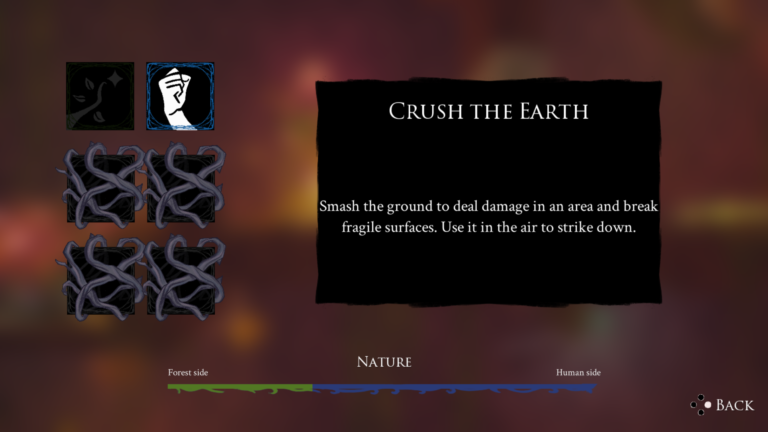
So remember, we got an ability pair, so we got 2 abilities to choose. Right now, as you can see, we have one equipped, but we can swap it!… but how?
void UClearingMenuWidget::OnButtonClicked(int32 ButtonIndex)
{
	if (!IsValid(_playerPawn)) return;
	if (!IsValid(_loadoutComponent)) return;

	// Button 0,1 → Pair 0; Button 2,3 → Pair 1; Button 4,5 → Pair 2...
	int32 AbilityParIndex = ButtonIndex / 2;
	// 0, 1, 0, 1... → a, b, a, b
	int32 AbilityIndex = ButtonIndex % 2;
	if (_abilityPairList.IsValidIndex(AbilityParIndex))
	{
		if (TSubclassOf<UBaseAbility> SelectedAbilityClass = _abilityPairList[AbilityParIndex]->AbilityPairs[AbilityIndex])
		{
			_loadoutComponent->EquipAbility(_abilityPairList[AbilityParIndex], SelectedAbilityClass);

			RefreshAbilityButton(ButtonIndex);

			int32 OtherIndex = (AbilityIndex == 0) ? ButtonIndex + 1 : ButtonIndex - 1;
			RefreshAbilityButton(OtherIndex);
		}
	}
}
And that would be it, through the index of the button we search for the ability that we want and then we equip it.
Now it is time to check the AbilityLoadout!
void UAbilityLoadoutComponent::AddUnlockedAbilityPair(UAbilityPairData* Pair)
{
	_unlockedAbilityPair.Add(Pair);
}

void UAbilityLoadoutComponent::EquipAbility(const UAbilityPairData* Pair, const TSubclassOf<UBaseAbility> AbilityClass)
{
	if (UAbilitySystemComponent* ASC = Cast<APlantformerPlayerPawn>(GetOwner())->GetAbilitySystemComponent())
	{
		if (FGameplayAbilitySpecHandle* Handle = _equippedAbilities.Find(Pair->SkillGroupTag))
		{
			FGameplayAbilitySpec* ExistingSpec = ASC->FindAbilitySpecFromHandle(*Handle);
			if (ExistingSpec && ExistingSpec->Ability->GetClass() == AbilityClass)
			{
				return; // Same ability already equipped, nothing to do
			}

			AutoDeactivateAbility(AbilityClass);
			ASC->ClearAbility(*Handle);
			_equippedAbilities.Remove(Pair->SkillGroupTag);
		}

		FGameplayAbilitySpecHandle NewHandle = ASC->GiveAbility(FGameplayAbilitySpec(AbilityClass));
		if (!NewHandle.IsValid()) return;

		_equippedAbilities.Add(Pair->SkillGroupTag, NewHandle);

		OnAbilityEquipped.Broadcast(AbilityClass);

		if (AbilityClass.GetDefaultObject()->GetAutoActivate())
		{
			AutoActivateAbility(AbilityClass);
		}
	}
}
The AddUnlockedAbilityPair() function is pretty straight forward, we just add the Pair to an array of DataAssets.
Now, inside EquipAbility() we use the power of GAS to swap the ability by giving it to the AbilitySystemComponent and also we save the handle for future use.
Last but not least, there’s an observer pattern implemented here. OnAbilityEquipped is a Delegate that will execute to update things like the HUD of the game and whatever other function that we seem fit.

And that would be all!
There’s also the automatization of the game with Jenkins but I decided to focus this post on the game itself. If you’re interested on the automatization click here to go to that post.
Thank you very much! And try the game on Steam!